
| 일 | 월 | 화 | 수 | 목 | 금 | 토 |
|---|---|---|---|---|---|---|
| 1 | 2 | 3 | 4 | 5 | 6 | |
| 7 | 8 | 9 | 10 | 11 | 12 | 13 |
| 14 | 15 | 16 | 17 | 18 | 19 | 20 |
| 21 | 22 | 23 | 24 | 25 | 26 | 27 |
| 28 | 29 | 30 | 31 |
Tags
- Project
- opencv
- Agile
- algorithm
- Scrum
- Method
- data analyze
- 애자일
- tensorflow
- instance
- pandas
- TypeScript
- keras
- python
- AWS
- visualizing
- webcrawling
- matplotlib
- Crawling
- ECS
- analyzing
- DANAWA
- 프로젝트
- 다나와
- angular
- 크롤링
- javascript
- 자바스크립트
- adaptive life cycle
- data
Archives
- Today
- Total
LiJell's 성장기
Data Type 본문
반응형
Array
const daysOfWeek = ['mon','tue','wed','thu','fri','sat'];

// Get Item from Array
console.log(daysOfWeek[4]);

// Add one more day to the array
daysOfWeek.push('sun');

console.log(daysOfWeek);
Object
const player = {
  name: "LiJell",
  points: 10,
  fat: true,
};

console.log(player);
console.log(player.name);
console.log(player["points"]);
const player = {
  name: "LiJell",
  points: 10,
  fat: true,
};

console.log(player);
console.log(player.name);
console.log(player["points"]);


player.fat = false;
console.log(player);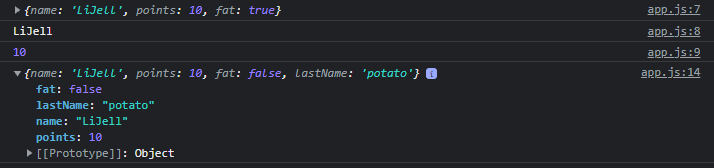
- const를 바꿀 수 없지만, const 안의 Object를 변경하는 것이기 때문에 부분 수정이 가능하다
- 하지만, const 전체를 바꾸려하면 에러가 생김
- Object 추가도 가능
반응형
'Front-End > JavaScript' 카테고리의 다른 글
| Conditional (0) | 2022.05.18 |
|---|---|
| Events (0) | 2022.05.17 |
| Function (0) | 2022.05.17 |
| Booleans (0) | 2022.05.13 |
| const 와 let의 차이점 (0) | 2022.05.13 |
'Front-End/JavaScript' Related Articles
more


Comments